How to Use AI Detector: Complete Step-by-Step Guide
Welcome to the official user guide for our free AI detector tool (aidetector.online). Whether you are an educator evaluating student essays with our AI detector for essays, an editor reviewing freelance submissions, an academic researcher auditing draft manuscripts, or a digital creator verifying client deliverables, this guide delivers an exhaustive, step-by-step walkthrough of our stylometric evaluation system.
Unlike black-box detection tools that output an arbitrary number with zero context, AI Detector delivers transparent, sentence-by-sentence linguistic forensics. In this comprehensive handbook, you will discover how to prepare your text, execute scans, decode probabilistic score bands, inspect structural anomalies, and utilize practical editorial techniques to humanize synthetic phrasing.
- Quick-Start Overview
- Step 1: Inputting & Preparing Text
- Step 2: Running the Evaluation & Verdicts
- Step 3: Interactive Heatmap Analysis
- Decoding the Score Spectrum
- The Stylometric Science
- How to Humanize AI-Flagged Text
- Managing History & Privacy
- Ethical Guidelines & False Positives
- Frequently Asked Questions
1. Quick-Start Overview
Modern large language models (LLMs) such as OpenAI ChatGPT, GPT-4o, Anthropic Claude 3.5 Sonnet, and Google Gemini produce remarkably fluent syntax. However, their underlying mathematical mechanics—autoregressive token sampling—leave distinct statistical footprints. AI Detector measures these footprints locally in your browser, guaranteeing total data confidentiality while returning granular diagnostic feedback within milliseconds.
The entire scanning process follows three intuitive stages:
- Input: Paste or draft up to 5,000 words directly into the interactive workspace.
- Analysis: Our multi-dimensional engine calculates burstiness, perplexity, lexical repetition, and syntactic variance in real time.
- Diagnostics: Review an overarching AI probability percentage, category classification, per-sentence color markup, and actionable editorial recommendations.
Step 1: Inputting & Preparing Your Text
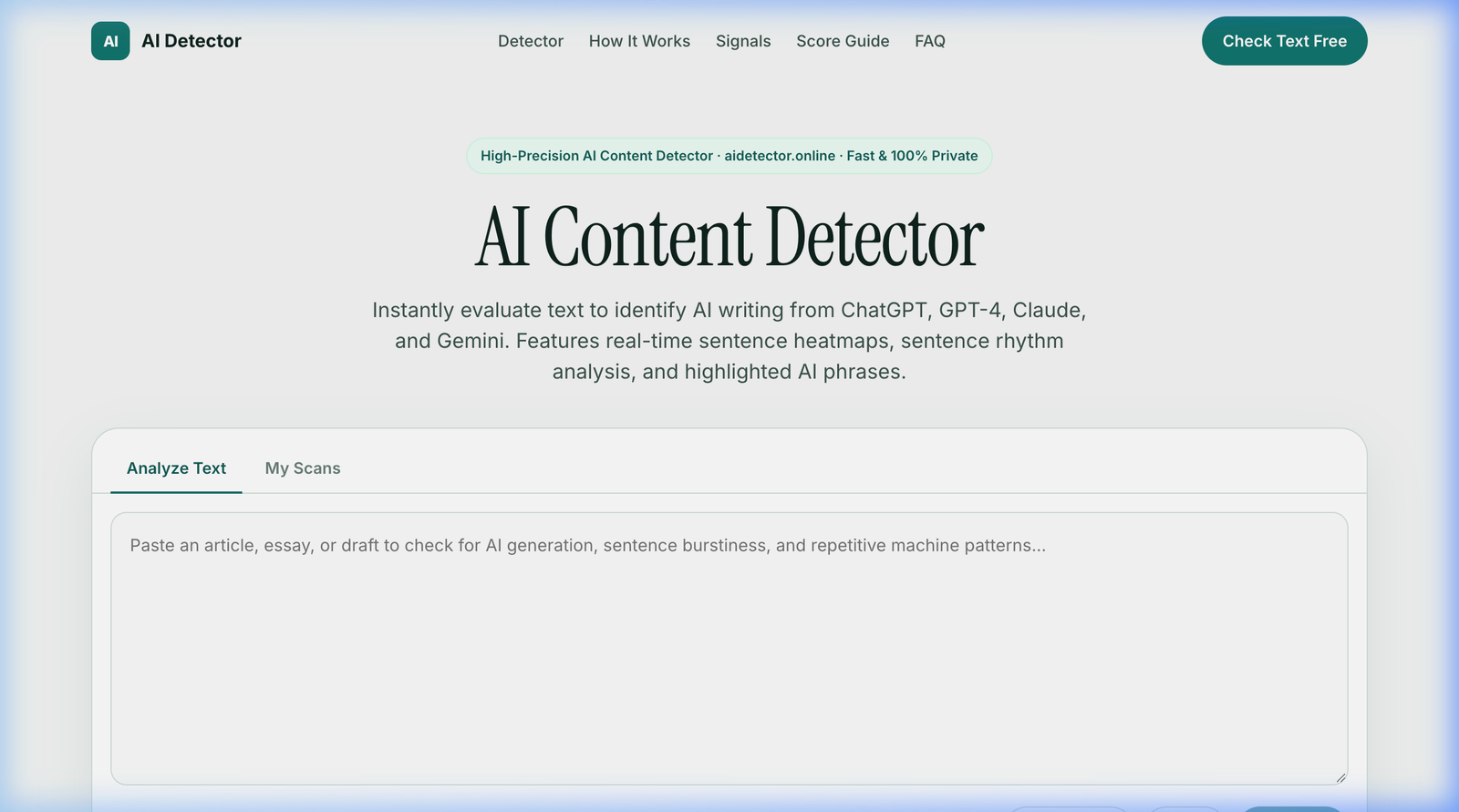
To initiate a scan, navigate to the AI Detector homepage. You will be greeted by the primary analyzer panel designed for immediate, distraction-free analysis.
Follow these practical recommendations when preparing your sample for analysis:
- Minimum Sample Length: While our algorithm can parse short phrases, statistical stylometry relies on sample variance. For optimal confidence and reliability, submit a passage of at least 50 to 100 words (roughly one to two complete paragraphs). Samples under 25 words possess insufficient linguistic breadth to establish a definitive baseline.
- Maximum Capacity: Each free scan accommodates up to 5,000 words per submission. For comprehensive book chapters or dissertations exceeding 5,000 words, we recommend segmenting the material into distinct topical sections or chapters to isolate stylistic shifts.
- Pasting Raw Text: Copy your text from any word processor (Microsoft Word, Google Docs, Apple Pages, PDF, or markdown editor) and paste it into the spacious input textarea. The live word counter located beneath the input area tracks your volume in real time.
- Sample Testing: If you wish to calibrate your understanding of how the tool identifies disparate writing patterns, click the "AI sample" or "Human sample" quick-preset buttons. These inject benchmark texts representing synthetic machine copy and authentic human prose respectively.
- Enhanced Stock Pattern Check: Check the box labeled "Enhanced stock pattern & template check" to enable ultra-sensitive scanning for robotic transition idioms (e.g., "in today's digital age", "delve into", "a testament to").
Step 2: Running the Evaluation & Reading the Score Card
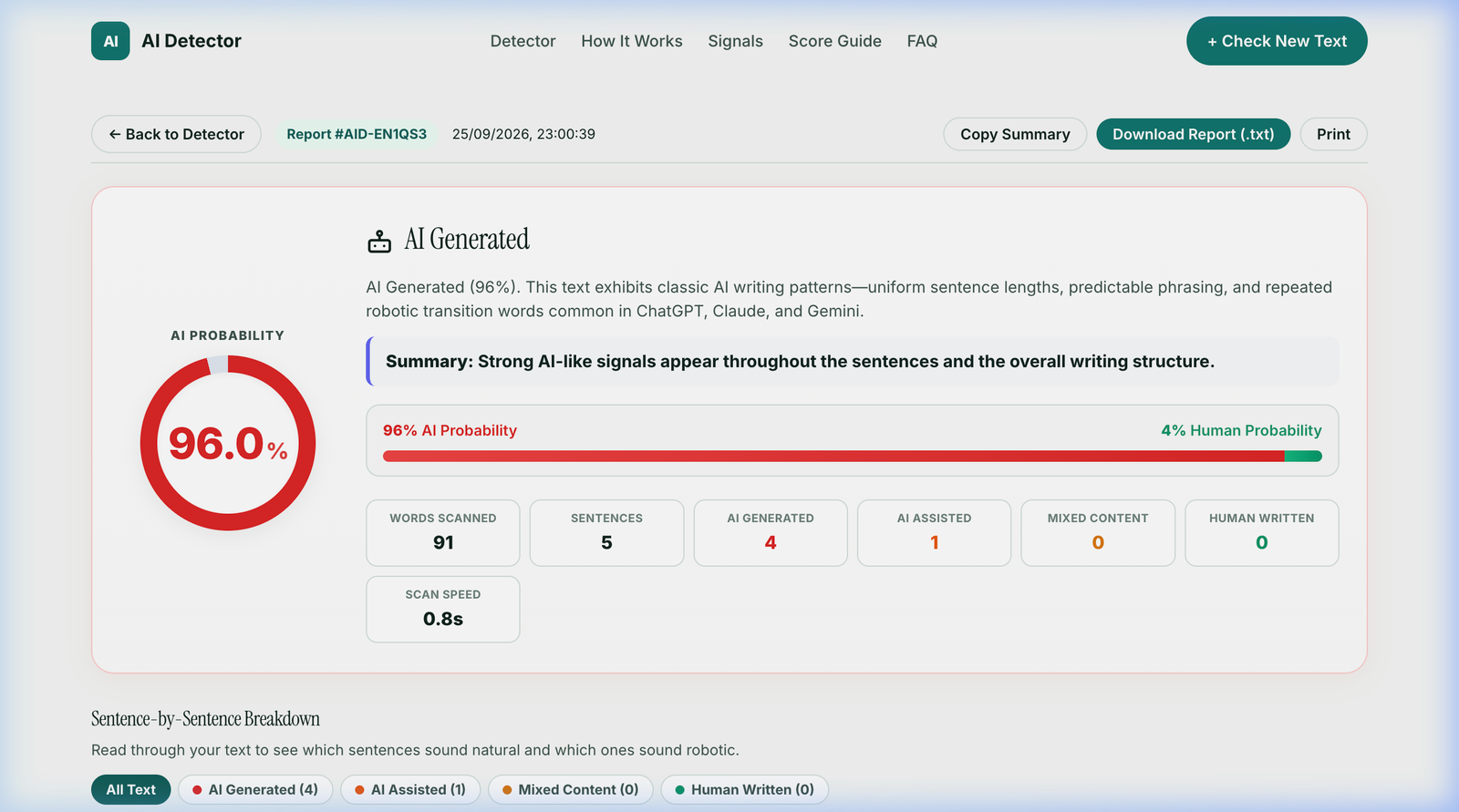
Once your text is placed in the editor, click the prominent teal "Detect AI" button. The client-side heuristic engine parses the complete document, performs token-level calculations, and renders an elevated diagnostic score card in under one second.
The evaluation header provides an instant high-level synthesis of your document's stylistic profile:
- AI Probability Gauge: A bold circular visual indicator presenting the exact probabilistic likelihood (0.0% to 100.0%) that the submission was generated by an artificial intelligence model. The color of the outer ring dynamically shifts from deep green (organic human) through amber (mixed) to vivid red (synthetic AI).
- Primary Classification Verdict: Above the analytical summary, the engine assigns one of four standardized classifications: AI Generated, AI Assisted, Mixed Content, or Human Written.
- Linguistic Probability Bar: A comparative dual-tone spectrum contrasting the percentage of AI Probability directly against Human Probability.
-
Quantitative Metrics Bar: A structured grid providing key document statistics:
- Words Scanned: Total word count included in the algorithmic calculation.
- Sentences: Total sentence units parsed by the punctuation tokenizer.
- AI Generated: Count of individual sentences displaying dominant synthetic traits.
- AI Assisted: Count of sentences displaying moderate machine assistance or heavy paraphrasing.
- Mixed Content: Sentences exhibiting balanced, hybrid stylistic indicators.
- Human Written: Count of sentences exhibiting organic cadence, rich vocabulary, and idiosyncratic burstiness.
- Scan Speed: Latency benchmark demonstrating client-side execution efficiency (typically 0.4s to 0.9s).
- Export & Share Actions: Convenient buttons allowing you to Copy Summary, Download Report (.txt), or Print / Save to PDF for archival records, academic submissions, or client audits.
Step 3: Inspecting the Sentence-by-Sentence Heatmap
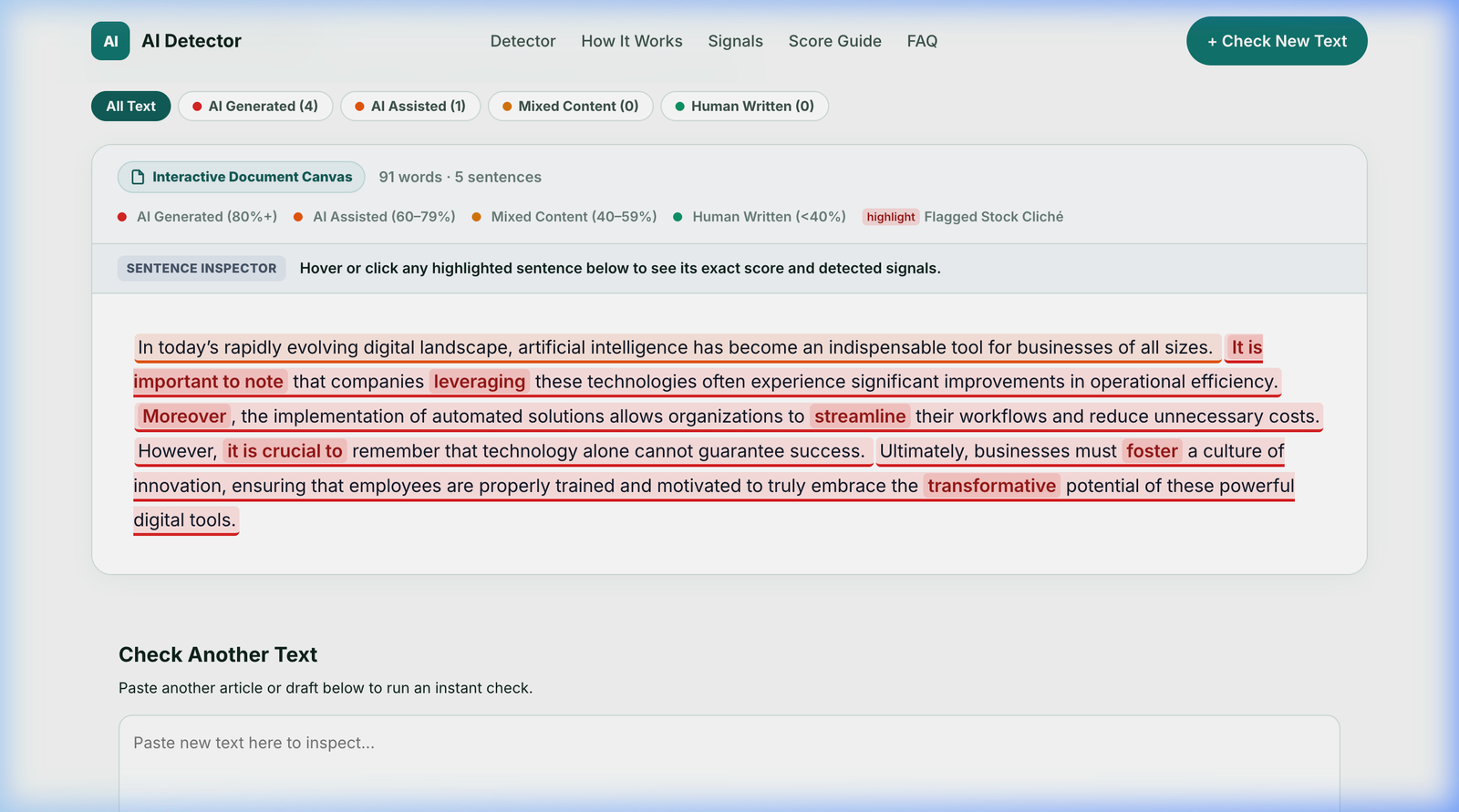
An overall percentage is valuable, but writers and editors need to pinpoint exactly where robotic phrasing occurs. Directly beneath the primary score card lies the Sentence-by-Sentence Breakdown and Interactive Document Canvas.
The canvas recreates your text with granular, color-coded highlights calibrated to each sentence's individual score:
- Red Highlight (AI Generated - 80%+): Highly uniform, predictable sentence structures that closely follow standard LLM completion paths.
- Orange Highlight (AI Assisted - 60%–79%): Passages containing typical synthetic structure, moderate hedging, or repetitive transitional words.
- Yellow/Amber Highlight (Mixed Content - 40%–59%): Hybrid phrasing that may represent either human text with formal phrasing or AI text that has received light surface editing.
- Green Highlight (Human Written - <40%): Organic syntax featuring natural sentence length variance, colloquial spontaneity, and distinct personal cadence.
- Flagged Stock Clichés: Specific overused phrases—such as "In today's rapidly evolving digital landscape", "It is important to note", "leveraging", "streamline", "foster", and "transformative"—are flagged with highlighted pill badges so you can instantly rewrite them.
Use the interactive filter pills above the canvas ("All Text", "AI Generated", "AI Assisted", "Mixed Content", "Human Written") to isolate specific tiers during editorial revision.
4. Decoding the Score Spectrum: What the Numbers Mean
AI detection is statistical and probabilistic. Because human writers occasionally employ formal sentence structures or transitional expressions, scores should always be interpreted within context. Refer to the reference matrix below:
| Score Tier | Classification | Stylistic Characteristics | Recommended Action |
|---|---|---|---|
| 0% – 25% | Organic Human | High burstiness, erratic sentence lengths, unique vocabulary, conversational idioms, authentic voice. | Ready to publish or submit. No editorial changes needed. |
| 26% – 45% | Mostly Human | Predominantly authentic prose with occasional formal phrases or technical terminology. | Normal for academic essays, legal briefs, and technical whitepapers. |
| 46% – 70% | Mixed / Edited | Equal balance of human thought and AI structuring; often seen in AI drafts rewritten by a human. | Review highlighted sentences in the heatmap; inject personal examples and vary cadence. |
| 71% – 89% | Strong AI Presence | Uniform sentence lengths, recurrent transitional crutches, predictable lexical choices, passive hedging. | Substantial revision required. Restructure paragraphs and replace boilerplate phrasing. |
| 90% – 100% | Pure AI Generated | Unmistakable machine syntax, near-zero burstiness variance, ubiquitous corporate LLM idioms. | Complete rewrite advisable. Do not submit as original student or professional work. |
5. The Stylometric Science: How the Engine Works
Unlike primitive regex tools, AI Detector relies on multi-dimensional computational stylometry. Our algorithm examines text across four orthogonal axes:
- Perplexity (Predictability): Measures how surprised an autoregressive language model would be by each successive word. Human writers frequently choose uncommon synonyms, quirky metaphors, and culturally specific idioms. LLMs consistently select high-probability tokens.
- Burstiness (Rhythm & Cadence): Analyzes the coefficient of variation (CV) in sentence lengths and clause structures. A human author might construct a crisp four-word statement followed immediately by an elaborate thirty-word sentence containing parentheticals and semicolons. AI models generate monotonous sentences averaging 18 to 24 words.
- Lexical Diversity & Repetition: Evaluates Type-Token Ratio (TTR) and n-gram recurrence. LLMs tend to recycle specific functional phrases across paragraphs, whereas human authors utilize natural synonymy and stylistic variety.
- Syntactic Footprints & Hedging: Flags distinctive structural conventions favored by safety-tuned models, including excessive passive voice, symmetrical bulleted parallelisms, and non-committal introductory hedging.
6. Practical Guide: How to Humanize AI-Flagged Text
If your draft received an elevated AI probability score, you can humanize and restore authentic character to your writing using these proven editorial techniques:
- Disrupt the Rhythm (Vary Sentence Lengths): Read your paragraphs aloud. If every sentence has nearly identical length, intentionally break long clauses into short, punchy statements, or combine two simple sentences into a complex compound thought.
- Purge the "AI Lexicon": Eliminate overused transition crutches. Search your document for words like "delve", "tapestry", "foster", "crucial", "testament", "moreover", "furthermore", and "in conclusion". Replace them with conversational transitions or delete them entirely.
- Inject Personal Anecdotes & Specifics: AI models generate generic advice because they lack personal lived experience. Adding a concrete date, a named location, an autobiographical reflection, or a tangible real-world case study immediately drops synthetic probability scores.
- Embrace Conversational Contractions: Unassisted AI models frequently avoid contractions (writing "do not", "it is", "cannot"). Human writers naturally employ contractions ("don't", "it's", "can't"), which instantly introduces organic voice.
- Rearrange Paragraph Openers: LLMs love starting paragraphs with chronological transitions ("First and foremost," "Additionally," "Lastly,"). Open your paragraphs with dynamic action verbs, direct questions, or provocative observations instead.
7. Managing Scan History & Privacy Guarantee
We take user privacy seriously. Most commercial detectors transmit your drafts to remote third-party databases, storing your intellectual property or using your essays to train future commercial AI models.
AI Detector is 100% private and client-side safe:
- No Server Database Storage: Your text is processed inside your browser runtime. Our servers never save, archive, or monetize your private documents.
- Zero Model Training: Your essays, research papers, and commercial articles are never fed into training sets.
- The "My Scans" Tab: To track previous scans during an active writing session, click the "My Scans" tab on the home screen. Recent scans are saved strictly in your browser's private local storage. You can re-open any past scan or clear your history with a single click.
8. Ethical Guidelines, Academic Integrity & False Positives
We strongly advocate for the responsible, ethical implementation of AI detection technologies:
- Decision Support, Not Absolute Proof: No automated AI detector in existence achieves 100.0% flawless accuracy across every genre of human literature. Extremely rigid writing styles—such as formal legal contracts, scientific abstracts, or non-native English writing (ESL)—can sometimes trigger false positives due to formulaic sentence structure.
- For Educators & Institutions: An AI detection score should serve as an initial conversation starter, never as sole disciplinary evidence for academic dishonesty. Always cross-reference detection outputs with student revision histories (such as Google Docs version histories) and conduct a brief verbal discussion with the author.
- For Freelancers & Content Teams: Establish transparent editorial guidelines regarding which portions of drafting may utilize AI tools (e.g., initial ideation or outlining) versus portions that require 100% authentic human composition.
9. Frequently Asked Questions (FAQ)
How many words can I analyze at one time?
AI Detector supports up to 5,000 words per single scan completely free. For longer books or academic theses, evaluate individual chapters sequentially for optimal accuracy.
Does AI Detector recognize content from GPT-4o, Claude 3.5, and Gemini?
Yes. Our stylometric heuristics are calibrated continuously against the outputs of leading state-of-the-art models, including OpenAI ChatGPT, GPT-4o, Anthropic Claude 3.5 Sonnet, Google Gemini, and open-source models like Llama 3.
Can I export or save my scan reports?
Yes. After running any scan, you can click "Download Report (.txt)" to obtain a complete text file report, click "Copy Summary" to copy results to your clipboard, or use "Print" to save a professional PDF summary.
How do I contact support if I have questions or feedback?
Our support team is available at support@aidetector.online. You can also send us a direct message via our Contact Us page.
Ready to Test Your Writing?
Put this guide into practice right now. Paste your text into AI Detector to get instant, sentence-by-sentence analysis.
Open AI Detector Free →